
Why Your Computer Table Choice Matters More Than Ever
In today’s digital-first world, your computer tables aren’t just furniture—it’s the command center of your professional life. With remote and hybrid work becoming permanent fixtures in our careers, the humble computer tables have evolved from a simple surface to hold your laptop into a sophisticated productivity hub that can make or break your workday.
Recent research from the Journal of Occupational Health found that professionals with optimized workspaces report 42% higher satisfaction and 27% fewer physical complaints than those working from makeshift setups. Whether you’re coding complex software, designing creative projects, or managing virtual teams, the right computer tables create the foundation for your success.
In this comprehensive guide, we’ll explore everything you need to know about selecting, setting up, and optimizing computer tables that enhance your productivity, protect your health, and adapt to your unique work style. Let’s transform your workspace into the productivity powerhouse you deserve.
The Evolution of Computer Tables: From Bulky Desks to Smart Workstations
Computer tables have undergone a remarkable transformation since their introduction. Understanding this evolution helps us appreciate the thoughtful design features in today’s options:
From Past to Present

- Early Computer Desks (1980s-1990s): Bulky units designed for enormous CRT monitors and tower computers, often featuring keyboard trays and dedicated printer shelves.
- Office Staples (2000s): Simplified designs as technology shrank, but still relatively utilitarian with limited style considerations.
- Modern Minimalism (2010s): Clean, streamlined designs reflecting the move toward laptops and wireless peripherals.
- Today’s Smart Workstations (2020s): Ergonomically advanced, technology-integrated solutions designed for flexibility and wellness.
According to Furniture Today, the computer table market has seen a 37% growth surge since 2020, driven primarily by increased remote work adoption and greater awareness of workspace ergonomics.
Key Factors to Consider When Choosing Your Computer Tables
Size and Spatial Requirements
Before falling in love with a design, consider these spatial factors:
Room Dimensions:
- Measure your available space carefully
- Allow minimum clearances (30″ in front of a desk for chair movement)
- Consider traffic patterns in multi-use spaces
Work Surface Area:
- Single monitor setup: Minimum 48″ width × 24″ depth
- Dual monitor setup: Minimum 60″ width × 30″ depth
- Combined work/creative space: Consider L-shaped designs
Height Considerations:
- Standard fixed height: 29-30″ from floor
- Adjustable range for sit-stand: 22-48″ typically
- Keyboard height: Optimal at elbow level when seated
“Selecting the right size isn’t just about fitting your space—it’s about creating a workspace that fits your body and workflow,” explains ergonomist Jennifer Clark from the American Ergonomics Association.
Material Quality and Construction
The materials of your computer table affect everything from durability to aesthetics:
Common Material Options: Ergonomic Office Chairs
-

Bizzo Ergonomic Operator Chair
R5.999,00 Add to basket -

Black Merryfair Wau Ergonomic High Back Black
R9.999,00 Add to basket -

Blink Ergonomic Mesh Chair Black
R6.599,00 Select options This product has multiple variants. The options may be chosen on the product page -

Bodyline Ergo High Back Chair
Price range: R2.299,00 through R7.999,00 Select options This product has multiple variants. The options may be chosen on the product page -

BodyLink Ergonomic Chair
Price range: R6.999,00 through R9.999,00 Select options This product has multiple variants. The options may be chosen on the product page -

Braxton Ergonomic Mesh Back Chair
Price range: R3.998,75 through R8.125,00 Select options This product has multiple variants. The options may be chosen on the product page -
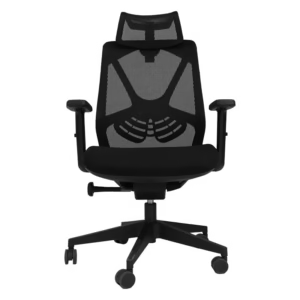
Butterfly Ergonomic Mesh Chair
Price range: R3.999,00 through R5.850,00 Select options This product has multiple variants. The options may be chosen on the product page -

Carbon Ergo Operators Chair
Price range: R3.794,00 through R5.175,00 Select options This product has multiple variants. The options may be chosen on the product page -
Promo 14% New

Carbon Mesh Ergonomic Chair
Price range: R2.588,00 through R3.588,00 Select options This product has multiple variants. The options may be chosen on the product page -

Crystal High Back Chair Red
Price range: R4.944,20 through R5.835,10 Select options This product has multiple variants. The options may be chosen on the product page -

Crystal Mid Back Chair Red
Price range: R4.554,80 through R5.369,00 Select options This product has multiple variants. The options may be chosen on the product page -

Cyber Mesh Back Ergo Chair
R4.890,00 Add to basket -

Davin Ergonomic High Back Chair
Read more -

Deli Orgonomic Mesh Back Office Chair
R3.299,00 Add to basket -

Dialogue Office High back Chair
Price range: R3.600,00 through R4.163,00 Select options This product has multiple variants. The options may be chosen on the product page -

Ergo 100 Operators Office Chair
Price range: R2.999,00 through R3.999,00 Select options This product has multiple variants. The options may be chosen on the product page -

Ergo 200 Opertors Chair 24/7
Price range: R1.999,00 through R3.775,00 Select options This product has multiple variants. The options may be chosen on the product page -

Ergo Flex High Back Chair
Price range: R1.699,00 through R2.200,00 Select options This product has multiple variants. The options may be chosen on the product page -

Ergo Flow Ergonomic Kneeling Chair
Read more -

Ergo Humanscale Mesh Back Chair
Read more -
Promo 13%

Ergo King Mesh Ergonomic Home Computer Chair
Original price was: R3.450,00.R2.999,00Current price is: R2.999,00. Select options This product has multiple variants. The options may be chosen on the product page -

Ergo King Midnight Mesh Office Chair
Read more -

Ergoflexi Arms Chair
R8.999,00 Add to basket -

Ergonet Eco Ergonomic Chair
Price range: R3.190,00 through R3.390,00 Select options This product has multiple variants. The options may be chosen on the product page


Construction Quality Indicators:
- Sturdy joints (dovetail for wood, welded for metal)
- Uniform finish without bubbling on laminates
- Weight capacity appropriate for your equipment (minimum 150 lbs recommended)
- Warranty length (better options offer 3-5 year guarantees)
Ergonomic Features
Ergonomics shouldn’t be optional in your computer tables selection:

Essential Ergonomic Elements:
- Height adjustability (ideal for alternating between sitting and standing)
- Adequate depth for proper monitor placement (arm’s length)
- Smooth, rounded edges to prevent pressure points
- Cable management solutions to reduce clutter
- Space for proper keyboard and mouse positioning
Research from the National Institute for Occupational Safety and Health indicates that ergonomic workspaces can reduce musculoskeletal disorders by up to 61% and increase productivity by 11%.
Storage Solutions and Organization
Effective storage integration keeps your workspace functional:
Popular Storage Options:
- Drawers for supplies and documents
- Keyboard trays to maximize surface area
- Monitor shelves/risers for ergonomic height
- CPU holders to keep towers off the floor
- Cable management systems (integrated channels, clips, etc.)
“The most productive workspaces maintain a balance between accessibility and minimalism,” notes productivity consultant James Harper. “Your essential tools should be within reach, but your surface should remain largely clear.”
Types of Computer Tables for Different Work Styles
Traditional Desk-Style Computer Tables
Best for: Dedicated home offices, traditional work environments Features: Substantial build, multiple drawers, large work surface Pros: Abundant storage, established look, often very durable Cons: Limited mobility, larger footprint, typically not height-adjustable
Standing Desks and Adjustable-Height Options
Best for: Health-conscious users, those with back issues, shared workspaces Features: Electric or manual height adjustment, memory settings Pros: Health benefits, versatility, adaptable to different users Cons: Higher price point, requires cable management consideration
According to a study published in the International Journal of Environmental Research and Public Health, alternating between sitting and standing can reduce upper back and neck pain by 54% while improving mood states and energy levels.
Space-Saving Computer Tables
Best for: Small apartments, multipurpose rooms, studio living Features: Compact footprint, folding components, wall-mounting options Pros: Maximizes limited space, often budget-friendly, versatile placement Cons: Limited workspace, fewer features, potentially less stable
Mobile Computer Carts and Rolling Workstations
Best for: Dynamic work environments, shared spaces, presentation needs Features: Wheels with locks, height adjustment, compact design Pros: Ultimate flexibility, ideal for collaborative environments Cons: Typically smaller surface area, potential stability issues
Gaming and Specialty Computer Tables
Best for: Gamers, creative professionals, specialized work Features: Cable management, headphone hooks, enhanced lighting Pros: Purpose-built features, sturdy construction for equipment Cons: Often larger footprint, gaming aesthetics might not suit all décors
Setting Up Your Ideal Computer Table Workspace
Ergonomic Positioning
Creating proper ergonomics starts with the correct setup:
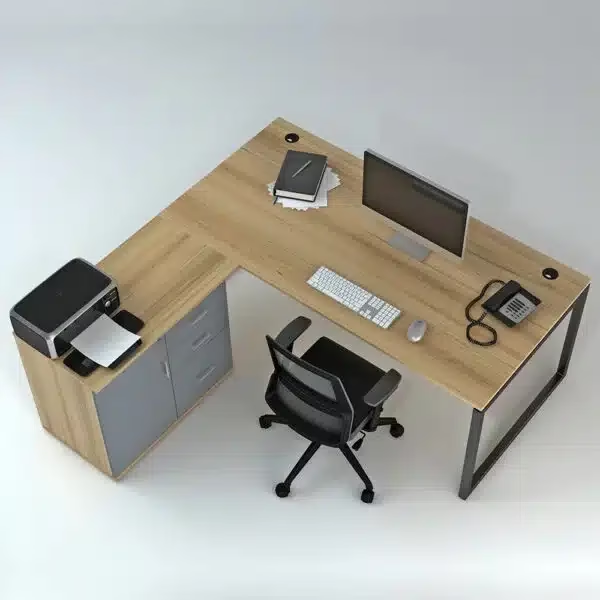
Monitor Placement:
- Top of the screen at or slightly below eye level
- Distance: arm’s length away (roughly 20-28 inches)
- Position: directly in front to avoid neck rotation
Keyboard and Mouse Position:
- Elbows at 90-degree angles when typing
- Wrists in a neutral position (not bent up or down)
- Mouse adjacent to the keyboard within easy reach
Chair Relationship:
- Feet flat on the floor (or footrest)
- Knees at approximately 90-degree angle
- Back supported by the chair
- 2-3 finger widths between seat edge and back of knees
Cable Management Strategies
Taming cable chaos improves both aesthetics and functionality:
Effective Solutions:
- Under-desk cable trays or baskets
- Cable sleeves for bundling cords
- Adhesive cable clips for routing
- Wireless peripherals where practical
- Strategic power strip placement
According to Workplace Design Magazine, 78% of professionals report that cable management significantly impacts their perception of workspace cleanliness and organization.
Lighting Considerations
Proper lighting reduces eye strain and enhances productivity:
Key Lighting Elements:
- Natural light: Position desk perpendicular to windows when possible
- Ambient lighting: Ceiling or overall room illumination
- Task lighting: Adjustable desk lamp for focused work
- Computer settings: Blue light filters, appropriate brightness
Expert Tip: The American Optometric Association recommends the 20-20-20 rule regardless of lighting quality: Every 20 minutes, look at something 20 feet away for 20 seconds to reduce digital eye strain.
Smart Accessories to Enhance Your Computer Table Setup
Transform your basic computer tables into a productivity powerhouse with these strategic additions:
Monitor Arms and Risers
Benefits include:
- Ergonomic height adjustment
- Reclaimed desk space
- Improved posture
- Flexibility for multiple monitor setups
Keyboard Trays and Ergonomic Input Devices
Options to consider:
- Under-desk keyboard trays with negative tilt
- Split ergonomic keyboards
- Vertical mice
- Wrist rests and supports
Cable Management Systems
Popular solutions:
- J-channel cable raceways
- Spiral cable wraps
- Under-desk cable hammocks
- Cable clips and ties
Storage and Organization Accessories
Effective additions:
- Monitor stands with integrated storage
- Under-desk drawers
- Pegboard or wall organizers above the desk
- Desk dividers for shared workspaces
Maintaining Your Computer Table for Longevity
Regular Cleaning Protocols
Establish these habits:
- Daily surface wipe-down with appropriate cleaners
- Weekly thorough cleaning including legs and supports
- Monthly cable organization refreshing
- Quarterly hardware tightening check
Surface Protection Strategies
Extend your table’s life with:
- Appropriate desk mats or pads
- Coasters for beverages
- Blotters for writing areas
- Edge protectors for high-wear zones
Trending Innovations in Computer Table Design for 2025
Stay ahead of the curve with these emerging trends:
Smart Furniture Integration
The newest computer tables feature:
- Built-in wireless charging
- IOT connectivity for height adjustment reminders
- Environmental sensors (temperature, humidity)
- App-controlled lighting and settings
Sustainable Materials and Manufacturing
Eco-conscious options include:
- Recycled materials construction
- FSC-certified wood sources
- Zero-VOC finishes
- Carbon-neutral manufacturing processes
- End-of-life recycling programs
According to the Sustainable Furnishings Council, demand for environmentally responsible office furniture has increased by 67% since 2020.
Biophilic Design Elements
Nature-inspired features gaining popularity:
- Live-edge wood surfaces
- Integrated planters
- Natural material finishes
- Designs that maximize natural light interaction
FAQs: Computer Table Selection and Setup
What’s the ideal budget for a quality computer table?
While prices vary widely based on materials, features, and brand, expect to invest:
- Entry-level: R11500-300 for basic functional designs
- Mid-range: R5300-800 for enhanced features and better materials
- Premium: R18900-20 000.00+ for high-end materials, smart features, and premium ergonomics
Consider this a long-term investment in your productivity and health—quality often correlates with longevity and performance.
How do I choose between a traditional desk and a standing desk?
Consider these factors:
- Health conditions (back issues often benefit from standing options)
- Work style (variety of positions vs. consistent setup)
- Budget (standing desks typically cost 30-50% more)
- Space constraints (mechanism may require additional clearance)
Many professionals now opt for adjustable models that offer both options, with Ergonomics Research suggesting the ideal arrangement is changing positions every 30-60 minutes.
What’s the best computer table for small spaces?
For limited spaces, consider:
- Wall-mounted folding desks (fold away when not in use)
- Corner desks (maximize awkward space)
- Secretary desks (close to hide work)
- Nesting designs (pull out when needed)
- Mobile carts (relocate as needed)
Measure carefully and remember that functionality should take precedence over size when space is limited.
How should I position my computer table in my room?
Optimal positioning depends on several factors:
- Natural light (avoid screen glare from windows)
- Room traffic patterns (minimize disruptions)
- Power outlet access (avoid tripping hazards)
- Background for video calls (professional appearance)
- Personal preference for view/wall positioning
Investing in Your Productivity and Wellbeing
Your computer table serves as the foundation of your work life—a seemingly simple choice that profoundly impacts your productivity, comfort, and even your health. By thoughtfully selecting a table that aligns with your specific needs, properly setting up your workspace with ergonomics in mind, and maintaining your investment, you’re not just buying furniture—you’re creating an environment that supports your success.
Whether you choose a classic desk-style computer table, a cutting-edge adjustable workstation, or a space-saving solution, the principles remain the same: prioritize ergonomics, consider your workflow, and create a space that inspires your best work.
Remember that your needs may evolve, and the perfect computer table should grow with you—through adjustability, quality construction, or thoughtful accessories. Your workspace isn’t static, and the best computer table solutions embrace this reality while providing a stable foundation for your professional journey.
Sources Used:
- Journal of Occupational Health (https://onlinelibrary.wiley.com/journal/13489585)
- American Ergonomics Association (https://www.aeaworld.org/)
- National Institute for Occupational Safety and Health (https://www.cdc.gov/niosh/index.htm)
- American Optometric Association (https://www.aoa.org/)
- International Journal of Environmental Research and Public Health (https://www.mdpi.com/journal/ijerph)